A progress note is the record of what happened in a session. It is part of the client's chart, which means it can be disclosed for treatment, payment and operations, and the client has a right to see it.
That last point is worth sitting with before you write the first one. If there is something you need to record that you would not want the client to read, it does not belong here — it belongs in the psychotherapy note, which is a separate record with separate rules.
Before you start
The session needs to have happened. Notes are written against an appointment, so book and complete the session first — see Booking an appointment.
Steps
1. Open the appointment
From the calendar, click the session. Or from Notes in the sidebar, which lists every session that has taken place and shows which ones still owe a note.
2. Write the note
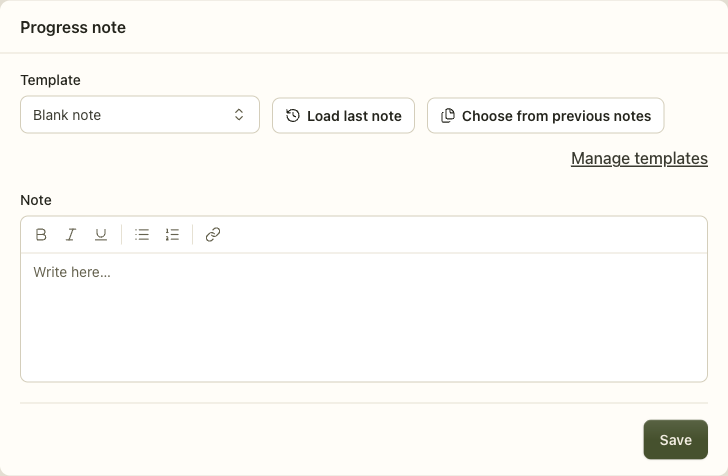
Template decides the shape of the note. Blank note gives you one open field. A SOAP or DAP template gives you the named sections instead. Changing the template rebuilds the form, so pick it before you start writing rather than after.
Load last note copies this client's previous note in, so you can edit rather than retype. Choose from previous notes lets you pick which one. Both are for the case where a session continues work from the last one, which is most of them.
Save keeps it as a draft. A draft is private to the practice, editable, and does not count as documentation. The Notes list will keep telling you the session owes a note until it is signed.
3. Sign it
Signing is what turns a draft into a clinical record. It stamps your name, your credential and the time, and the note stops being editable.
What happens next
A signed note is locked, and editing it takes a deliberate step. This is not Insight being strict — an editable clinical record is not evidence of anything, and the ability to quietly change what you wrote after the fact is the thing that makes a record worthless in an audit or a court.
You have two ways to correct one, and they are not interchangeable.
An addendum is a new, dated, signed entry attached to the original. The original stays exactly as it was, and the record shows both what was written and what was added. This is the usual answer, and it is what a correction is supposed to look like.
Reopen for editing is the other. It appears on a locked note for the clinician who saw the client and for the practice owner, and it clears the signature — the note goes back to being a draft, the co-signature goes with it, and the reopening is recorded in the audit trail. Use it when the note is wrong rather than incomplete: a mistyped date, the wrong client's detail pasted in. If the record simply needs more said, the addendum is the honest instrument, because it leaves the original attestation standing.
If you are supervised, signing sends the note to your supervisor for co-signature rather than locking it. It stays editable until they co-sign. Their signature is what makes it final.
Psychotherapy notes
Insight keeps a second, separate note on every session, and it exists because US federal law (HIPAA §164.508) treats one narrowly-defined kind of note differently from the rest of the chart.
What belongs there: your own process notes. Your hypotheses, your countertransference, the things you are thinking about but have not concluded.
What does not: diagnosis, treatment plan, symptoms, prognosis, progress, modality, and session start and stop times. The law explicitly excludes all of those from a psychotherapy note, which means they belong in the progress note whether you like it or not.
The practical difference:
- A psychotherapy note is visible only to you, its author. Not to the practice owner, not to a supervisor.
- It is left out of a records request and out of anything shared with an insurer. An export carries it only where a signed authorisation for psychotherapy notes exists, and the practice-wide export never carries it at all.
- Disclosing one requires a specific signed authorization from the client — a general consent to treat is not enough.
- Access to it is audited separately from the rest of the chart.
If you are unsure where something goes, put it in the progress note and keep the psychotherapy note narrow. An over-broad psychotherapy note blocks disclosure that is legitimate and gets in the way of the client's right to their own record.
When it goes wrong
You cannot edit a note you just signed. That is the lock. Either add an addendum, or use Reopen for editing on the note — which clears the signature and is recorded, so reach for it when the note is wrong rather than merely incomplete.
"Awaiting co-signature." You are supervised. Your supervisor needs to co-sign before the note is final. It stays editable until they do.
A session keeps appearing as owing a note. A saved draft is not a signed note. Open it and sign it.
You cannot see a colleague's note. This is not the caseload rule, and widening somebody's access scope will not change it: a progress note is readable by the clinician who saw the client, by the practice owner, by that clinician's supervisor, and by anybody holding a client-access grant. A clinician scoped to the whole practice still cannot read a colleague's session note — the screen says so where it refuses you. Psychotherapy notes are narrower still: the author alone, including against the owner.
Related
- Notes and documentation — templates, supervision, and the note lifecycle
- Booking an appointment — the session a note is written against
- Clients — the chart a note belongs to, and who can see it