Sessions move and sessions fall through. What Insight needs from you is one fact: who cancelled. Everything else — whether it is billable, what it is called in your reports, what the client sees — follows from that.
Rescheduling
Drag the session to its new place on the calendar, or open it and change the date and time. Either way it is the same appointment, moved. Its note, its charge and its history come with it.
The client is not told automatically. Insight offers to send them a message once the move is saved, and you decide.
Cancelling
Open the session and choose Cancel appointment.
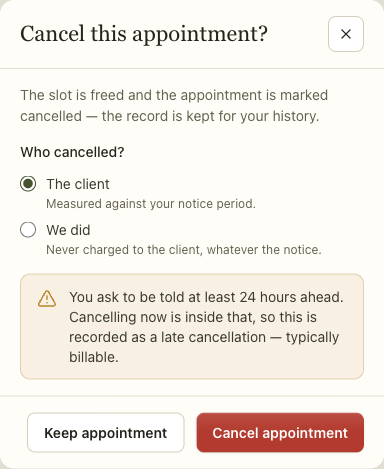
Who cancelled
The client. Measured against your notice period. Inside it, the session is recorded as a late cancellation, which is typically billable. Outside it, an ordinary cancellation, which is not.
We did. Never charged to the client, whatever the notice. A practice that cancels on somebody does not bill them for it, and the product will not let that happen by accident.
The dialog tells you which one you are about to record, and why, before you commit. In the screenshot above the session is inside a 24-hour notice period, so it says so.
Your notice period is set under Settings › Calendar. It is the number the phrase "at least 24 hours" comes from, and changing it changes what counts as late from that point on — not retrospectively.
What happens to the slot
The time is freed immediately, and the appointment is kept, marked cancelled. It is not deleted. A cancelled session is part of the client's history — it is how "this is the third time this month" is a thing you can see rather than a thing you half-remember.
If somebody on the waitlist wants that time, they will be offered when you next book into it. See Scheduling.
Telling the client
Insight does not email anybody automatically when you cancel or move a session. After you save, it offers to send a message, and you choose.
That is deliberate. Sometimes you are cancelling because you have already spoken to them. Sometimes the message needs to say something a template cannot. An automatic email is right often enough to be tempting and wrong often enough to be a problem.
Reminders are separate, and they do go out on their own schedule — see Scheduling.
Recurring sessions
Changing one session in a series changes only that session. Moving a standing Tuesday to a Wednesday once does not move the rest of the series, and the moved session is marked as an exception so it keeps its new time.
There is no way yet to move a whole series from a given date onwards — "Wednesdays from March" means cancelling the remaining Tuesdays and booking the new pattern. Deliberately, rather than as an oversight: a dropdown that silently rewrote forty bookings is how a client turns up at the old time.
Sessions already in the past are never rewritten either way, because February happened.
When it goes wrong
A cancellation you meant to be free was charged. Not by Insight — a cancellation never raises a fee on its own. Somebody pressed Add late cancellation fee on the appointment itself. That is deliberate: clinicians waive these constantly, and a fee that appeared by itself would be reversed by hand more often than it was kept. Settle or waive it from the same appointment, not from Billing — it is an appointment fee rather than a charge, so it never appears as a claim line.
You cannot find a cancelled session. The calendar does not hide them — with no status filter set every status is drawn, and a cancelled session appears struck through in place. If one is missing, look for a status filter somebody has already applied, or the wrong clinician selected. The filter is the only thing that can hide them, so it is the first thing to clear rather than the thing to reach for.
The client says they were not told. They were not, unless you sent the message. Check the client's timeline, which records what was sent and when.
A whole series moved when you meant one session. This cannot happen. Changing an occurrence moves that occurrence and detaches it from the series; there is no control that edits a live series, and none that asks "this one or everything after". If a run of sessions all moved, they were moved one at a time. To change the pattern itself, cancel the remaining sessions and book the new series.
Related
- Booking an appointment — making the session in the first place
- Scheduling — reminders, the waitlist, and appointment requests
- Billing and payroll — where a late-cancellation charge lands