Bookable hours are the weekly shape you offer — "Tuesdays and Thursdays, 9 to 1". They govern what clients can book themselves through the portal, and what the waitlist can be matched against.
They do not restrict you. You can book anybody at any time, whatever your hours say. See Booking an appointment.
Why nothing is bookable, even though you set hours
This is the thing worth understanding first, because it looks like a fault and is not.
Your hours are a rule. What a client can actually book is a result, and the two are different numbers. Insight starts from your pattern and then takes away:
- time off and any other exception that blocks
- sessions already booked
So a Tuesday 9-to-1 that is fully booked produces nothing, and correctly. The page shows you both numbers side by side so the gap between them is visible rather than mysterious.
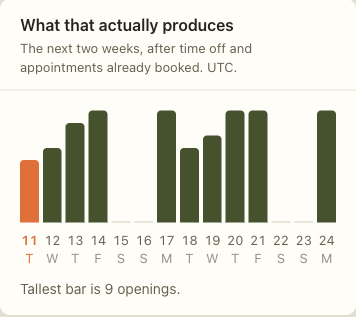
Each bar is one day's openings, measured against your busiest day in the fortnight. A flat day produced nothing. If every bar is flat while your pattern says otherwise, the cause is one of the two things above — almost always time off you forgot about, or a week that simply filled up. It is not your minimum notice period: this chart is drawn with that ignored, so it shows the hours you have rather than what a client could book this minute.
Setting your hours
1. Open Bookable hours
Under Schedule, in the tab strip at the top.
2. Add a window
Add hours opens the form. A window is one continuous stretch on one weekday — "Tuesday, 09:00 to 13:00". A day with a break in the middle is two windows, not one with a gap.
Timezone is stored with the window as local clock time, not as a fixed moment. Your Tuesday 9am stays 9am when the clocks change, which is what you want and not what a naive calendar does.
Applies from and Applies until bound the window in time. Leave the second blank for hours that carry on indefinitely. Hours that start in the future are offered from that date and not before.
Open to new clients decides whether these hours accept somebody who is not already a client. Turn it off for a window you are keeping for existing clients.
Services bookable in these hours narrows a window to particular work. "Tuesday mornings are intakes only" is this field. An intake runs 50 to 90 minutes against a 45-minute session, and mixing them fragments the day.
3. Check the week
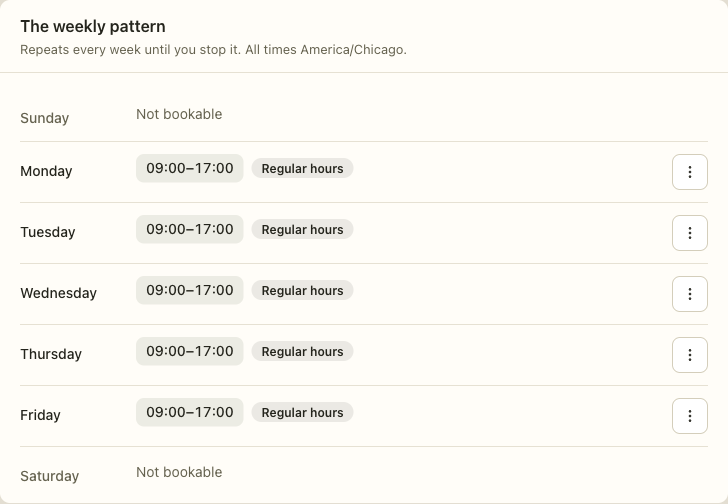
All seven days are always listed, including the ones with nothing on them. A day that is not bookable says so, because a missing Thursday is the thing you are most likely to overlook and least likely to notice by its absence.
Time off
Add time off blocks a period against your pattern — a holiday, a conference, an afternoon out. It removes those slots from what clients can book, and it warns you about sessions already in the way.
The same control adds extra hours that are not part of the weekly pattern: one Saturday morning, a late evening for somebody who cannot make daytime. Untick "This blocks time" and the exception adds instead of removing.
When it goes wrong
You added hours and the portal still shows nothing. Read the fortnight chart. If the bars are flat, something is subtracting: time off, or existing bookings. The chart ignores your minimum notice period, so a flat chart is never explained by that — but a chart with openings and an empty portal can be, because the notice period applies to what a client may book. If the chart shows openings and the portal does not, check that online booking is switched on for the practice and that the window is open to the kind of client trying to book.
Hours you set for next month are not showing. They should. If they are not, check the Applies from date is what you meant — a window that starts in the future is offered from that date onwards.
A session sits outside your bookable hours. That is allowed. Your hours govern what clients can book themselves, not what you can book for them.
The summary says hours but no openings. The two numbers are measuring different things — hours are what you offered, openings are what survives. A gap between them is normal. A gap of everything means something is blocking.
Related
- Scheduling — the calendar, the waitlist, and appointment requests
- Booking an appointment — booking somebody yourself
- Client portal — what clients see when they book